A calculator for hours and minutes
Adding up times on a normal calculator goes wrong, because 4.30 + 8.30 gives 12.60, not 13 hours. This time calculator counts in hours and minutes, so every 60 minutes becomes an hour. Use it for timesheets, shift totals, cooking times, video lengths, flight times, race splits or anything else you'd otherwise work out on paper.
How to use it
- Type a time without the colon. Digits fill in from the right: 4, 3, 0 shows
04:30. The last two digits are minutes, the rest are hours. - Press +, −, × or ÷. After + or − you type another time. After × or ÷ you type a plain number, like 5 or 1.5.
- Keep going for as many steps as you like. The whole calculation stays on screen like a till receipt, so you can check every line.
- Press = for the answer. Press an operator straight after to keep calculating with the result, or start typing to begin a new calculation.
Examples
| What you want | Type | Answer |
|---|---|---|
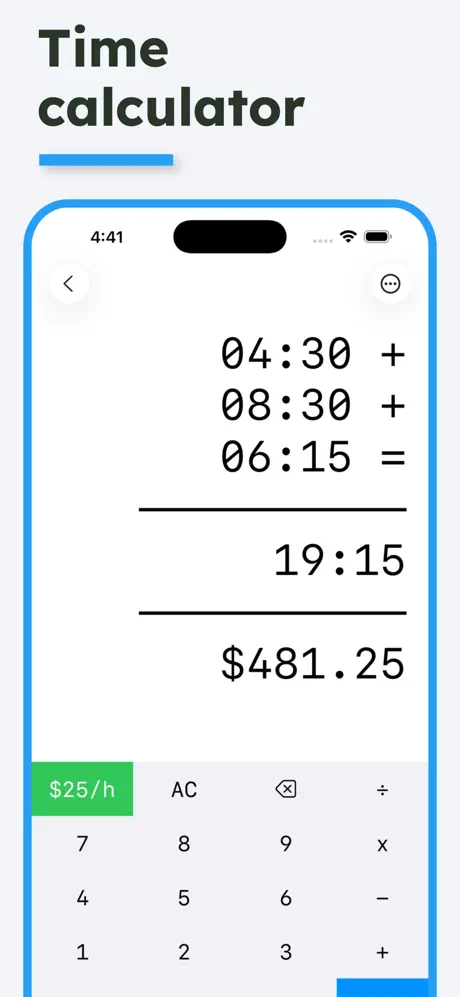
| Add up three shifts | 430 + 830 + 615 = | 19:15 |
| Take a lunch break off a shift | 830 − 45 = | 07:45 |
| A week of 8.5-hour days | 830 × 5 = | 42:30 |
| Split a time into three equal parts | 215 ÷ 3 = | 00:45 |
| Pay for 19 h 15 min at 25/hour | 1915, then the rate key | 481.25 |
| Add two lap times (.ms format) | 123456 + 119870 = | 00:02:43.326 |
Seconds, milliseconds and days
The hh:mm format suits work hours. Switch to hh:mm:ss to work with seconds, for example to add up video clips or running splits, or to .ms for milliseconds when you add lap and split times from a stopwatch. Results over 24 hours show as total hours by default, such as 42:30. Turn on Days to show them as days plus hours instead: (+1) 18:30.
Hours to pay
Tap the green rate key (or Hourly rate) to set your hourly rate and currency. After that, pressing it gives the pay for the current total instead of only the time, which is a quick way to check a timesheet or price a job. Your rate, format and the last 100 calculations are saved in this browser only.
Frequently asked questions
How do I add hours and minutes?
Type the first time, press +, type the next time and press =. For 4 h 30 min + 8 h 30 min, type 430 + 830 =. The answer is 13:00. The calculator carries every 60 minutes over into an hour for you.
What if I type more than 59 minutes?
That's fine. 00:90 counts as 90 minutes, which is 1 hour 30 minutes, so the answer comes out right either way.
What happens if the result is negative?
It is shown with a minus sign, such as - 01:30. That happens when you subtract more time than you started with, for example 06:00 − 07:30.
Can I multiply or divide a time?
Yes. After × or ÷ you type a plain number instead of a time. 08:30 × 5 = 42:30 gives a five-day week of 8.5-hour shifts, and 02:15 ÷ 3 = 00:45 splits a time into three equal parts.
Does it work with seconds and milliseconds?
Yes. Switch the format to hh:mm:ss for seconds, or .ms for milliseconds. Digits still fill in from the right, so 13045 in hh:mm:ss becomes 01:30:45.
Does it follow the order of operations?
No. Like a basic pocket calculator, it works from left to right: 01:00 + 01:00 × 2 is 04:00, not 03:00. Press = first if you want to multiply only the last time.
Need something else? Find the time between two clock times with the time duration calculator, total a list of durations side by side with the time addition calculator, or turn hours into decimals with time to decimal.